Export hours for Excel or your payroll provider
Download the scheduled hours of a period as a file for Excel: one line per shift, or totals per staff member.
Who can do this?
AdminManager
Does your payroll provider (sociaal secretariaat) or accountant need the hours? Download them as a file you open in Excel.
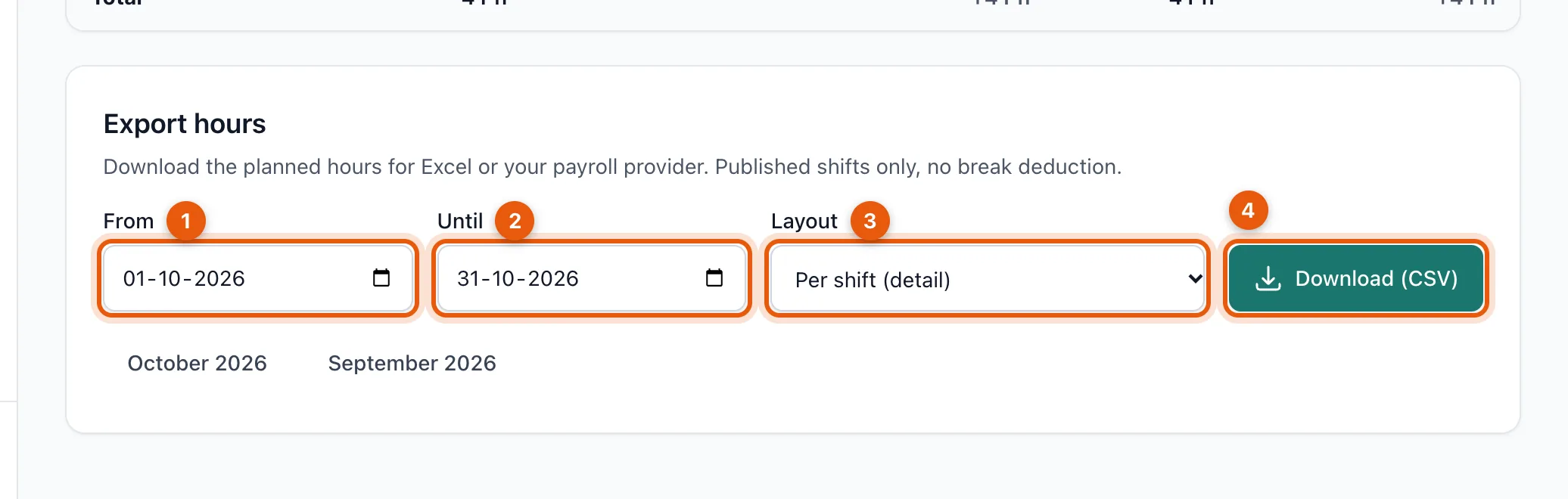
- Open Hours and scroll to Export hours.
- Choose the period with From (1) and Until (2). The buttons below fill in the month shown or the previous month.
- Choose the layout (3):
- Per shift (detail): one line per shift with date, staff member, status, position, start, end and hours.
- Per employee (totals): per person the number of shifts and the total hours, with a total line.
- Click Download (CSV) (4).
What's in the file?
- The same hours as on the Hours screen: only published shifts, with no break deduction.
- A shift that runs over the edge of the period only counts for the part inside the period.
- Dates are written as day/month/year and hours with a decimal comma (e.g. 6,5), so Belgian Excel reads them as numbers straight away.
- You can export at most one year at a time.
Related articles
Didn’t find what you were looking for? Search again: