Set up recurring availability
Can you work at the same times every week? With a recurring rule you're automatically available for the blocks within those hours.
With a recurring rule you say once when you can work every week, for example Friday from 17:00 to 02:00. BarPlanner then makes you available for every open block that falls fully within those hours.
Add a rule
-
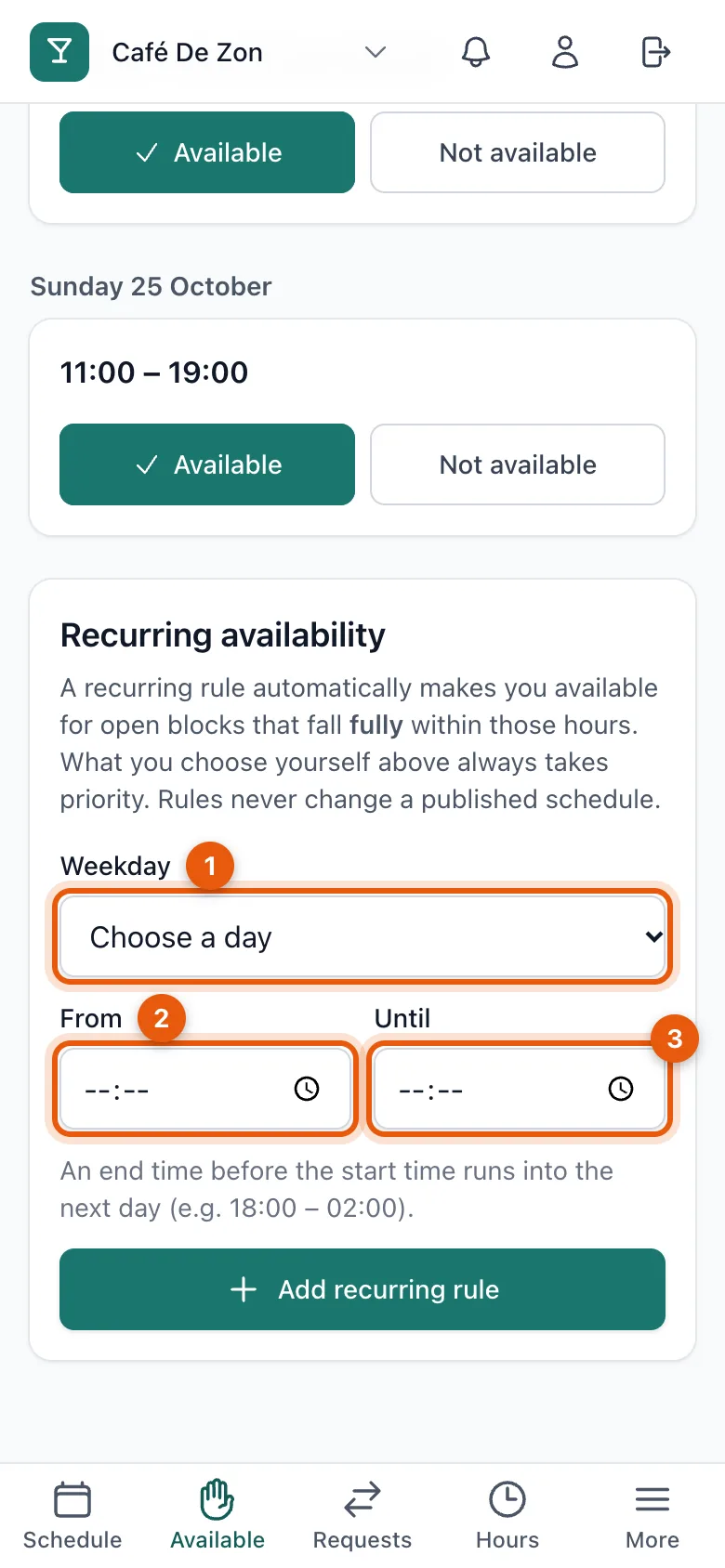
Open Availability and scroll to Recurring availability.
-
Choose the weekday (1), the time from (2) and until (3).
-
Tap Add recurring rule.
In the list of open blocks you see Via recurring rule next to the blocks the rule fills in.
Exceptions
Can't make it just once? Tap Not available for that block. What you choose yourself always overrides a recurring rule; you then see Exception to recurring rule.
Remove a rule
Tap Delete next to the rule. Blocks that are already published don't change: a rule never changes a published schedule.
Related articles
- Give your availabilityMark for each time block whether you can work. Being available is not a commitment yet: only the published schedule counts.
- Why can't I change my availability any more?Once your manager publishes a block, it's fixed and availability closes. Can't come after all? Ask for a takeover or a cancellation.
Didn’t find what you were looking for? Search again: