Give your availability
Mark for each time block whether you can work. Being available is not a commitment yet: only the published schedule counts.
Who can do this?
Everyone
Your manager only plans once they know who can work. That's why you tell BarPlanner for each time block whether you're available. You see the open blocks for the next 4 weeks.
Per block
- Open Availability.
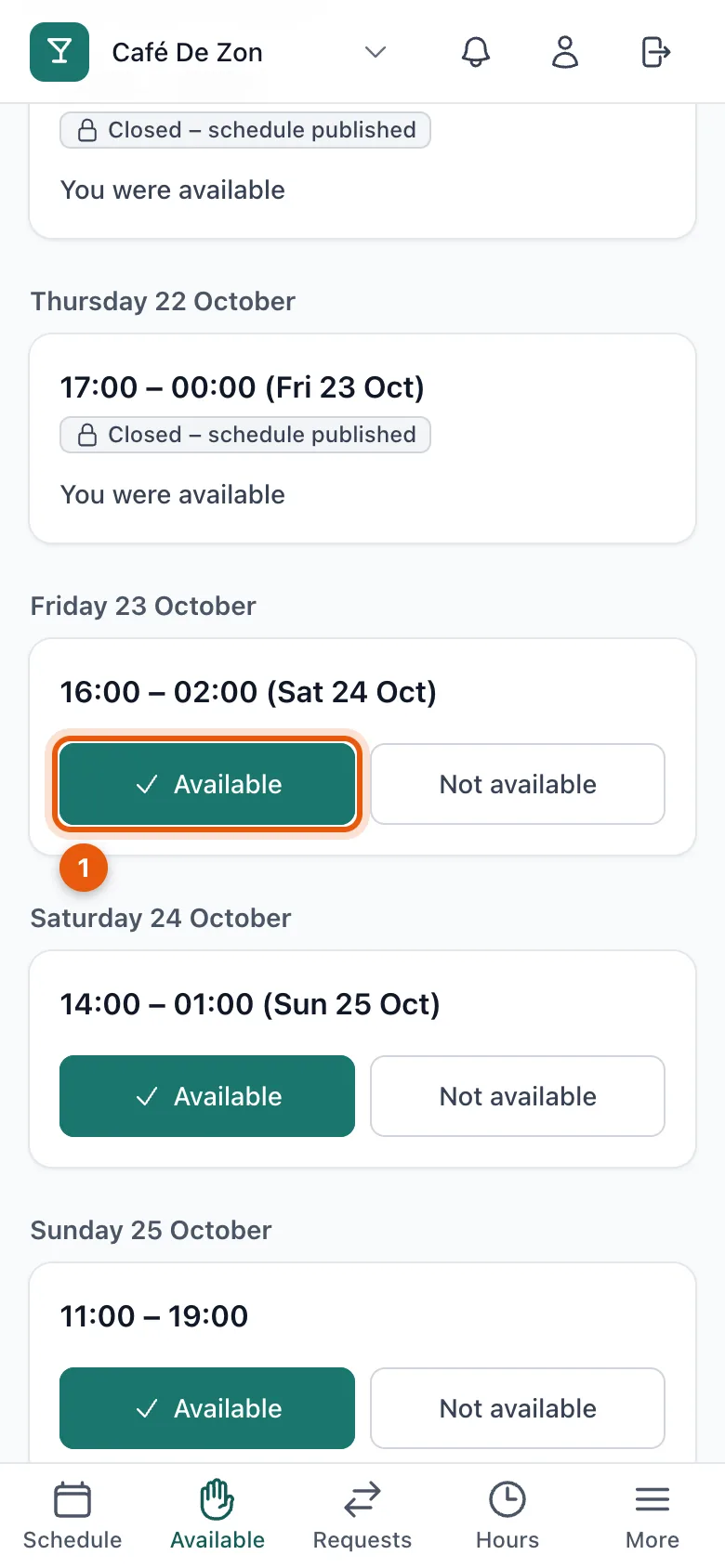
- For each block, tap Available (1) or Not available. Your choice is saved straight away.
The same every week?
Can you work every Friday evening, for example? Then set up a recurring rule, so you don't have to mark every block separately. See Set up recurring availability.
No open blocks?
Does it say No open blocks? Then your manager hasn't started planning the coming weeks yet. You get a notification as soon as blocks are open.
Related articles
- Set up recurring availabilityCan you work at the same times every week? With a recurring rule you're automatically available for the blocks within those hours.
- Why can't I change my availability any more?Once your manager publishes a block, it's fixed and availability closes. Can't come after all? Ask for a takeover or a cancellation.
- View your scheduleThe schedule shows the confirmed shifts of the week, who works with you and how many hours you are scheduled.
Didn’t find what you were looking for? Search again: